
Which photos make the best pet cross-stitch patterns?
What makes a photo chart well: light, distance, background and angle. Real examples of good and poor photos turned into patterns.
By The Hoop & Paw team · Published · 2 min read
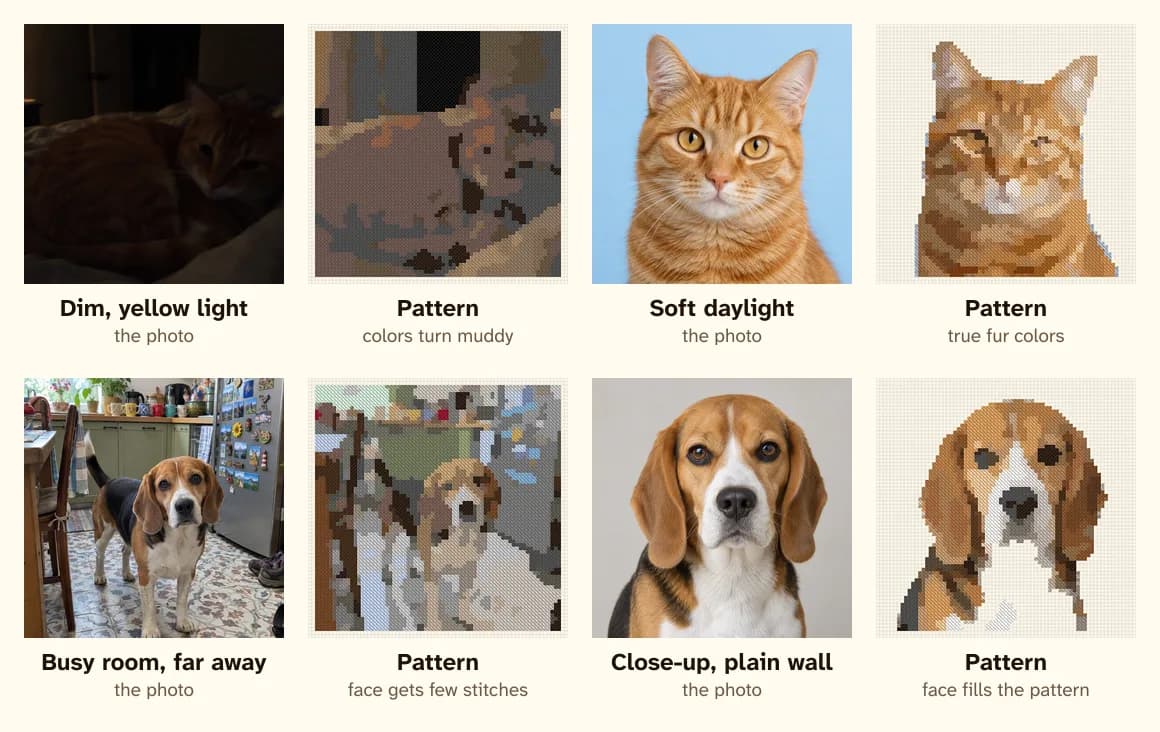
The photo matters more than any setting. A sharp, well-lit close-up turns into a pattern that looks like your pet; a dim snapshot from across the room rarely does — no matter how many colors you use.
Light: daylight beats everything
Soft daylight from a window shows fur in its true colors. Indoor lamps turn everything yellow-brown, and flash flattens the face and puts bright dots in the eyes. In the top row above, the dim photo gives a muddy, brownish pattern; the daylight photo of a similar cat keeps the orange stripes and the cream muzzle.
Try: sit your pet near a window, with the light coming from the side or front — not behind them.
Distance: get close
The face should fill most of the frame. In a 100-stitch pattern, a pet photographed from across a room might get 30 stitches for its whole head. In the bottom row, the beagle in a busy kitchen gets a few dozen stitches for its face; the close-up gets most of the pattern.
Try: crouch down to your pet's eye level and fill the frame with their head and shoulders.
Background: plain is easier
A plain wall or floor behind your pet can be left unstitched, so the pattern is just your pet — less stitching, and a cleaner look. A busy background becomes a lot of extra colors and stitches. If your favorite photo has clutter behind it, the optional AI Realistic style can remove the background before charting.
Angle: both eyes, facing you
Front-facing photos with both eyes visible make the most recognizable patterns. A side view can work for breeds with a distinctive profile (greyhounds, collies), but the eyes are what people recognize first.
Sharpness: the eyes must be in focus
A little blur in the fur doesn't matter at stitch size, but blurry eyes do. Zoom in on your photo: if the eyes are crisp, it will work.
Old photos and pets who are gone
For memorial patterns, you may only have older or darker photos. Crop as close as you can and try a few in the free preview — and if the photo is dark or cluttered, an AI clean-up often helps a lot. See pet memorial patterns.