
Confetti stitches: what they are and how to avoid them
Confetti stitches are single stitches of a color scattered across a chart. Why they happen in photo patterns, why they're slow to stitch, and how clean-up removes most of them.
By The Hoop & Paw team · Published · 2 min read
In cross-stitch, confetti means single stitches of one color surrounded by other colors, scattered across the chart like confetti. Every one needs its own start and finish, so a chart full of them is slow and fiddly to stitch — and often looks noisy too.
Why photo patterns are full of confetti
A photo has millions of slightly different colors. When a converter matches each square to the nearest thread, neighboring squares often land on different threads by a whisker, especially in fur and shadows. The result: speckles everywhere.
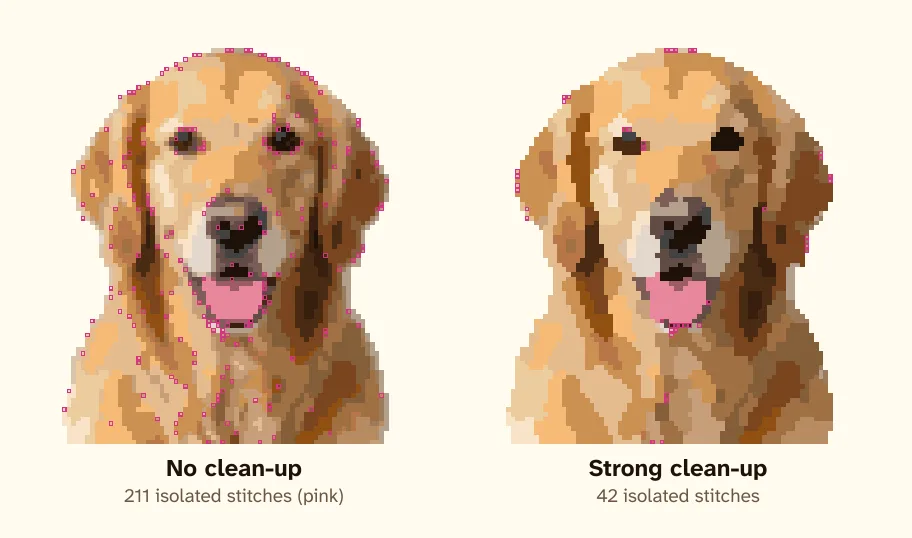
In the image above, the left chart is a straight conversion of a golden retriever with no clean-up; every isolated stitch is outlined in pink. The right chart is the same photo after a strong clean-up pass: most of the speckles have joined a neighboring block of color, and the face reads more clearly.
What clean-up does
A clean-up pass looks at each isolated stitch and its neighbors. If a neighboring color is close enough, the stitch takes that color. It protects small details that matter — the catchlight in an eye, the dark of a nostril — so they aren't "cleaned" away.
How much confetti is OK?
Some is fine, even good: a few scattered stitches give fur texture. Brindle, roan, merle and tortoiseshell coats genuinely look speckled, and a little confetti is part of their character. What you want to avoid is a whole background or a smooth coat full of single stitches.
Stitching the confetti that remains
- Work in 10 × 10 blocks and stitch every color in the block before moving on — the parking method is made for this.
- Use short lengths of thread for colors that only appear here and there.
- Carry a thread across the back no more than 3–4 squares; for longer jumps, finish and restart.
Our pattern maker cleans up confetti by default — you can make it stronger or turn it off under "Clean up stray stitches (confetti)" in the Advanced settings.